


Page 384 - TransAT_Tutorial_Manual
P. 384
TransAT Tutorial Manual                         9.2. Forced Convection in an Isothermal Pipe


                   • Click    to view or edit the UDF

                   • Repeat the above steps for the second UDF, called crossflow output, which is located under
                     Entry Point \ Simulation End type of template


                   Finally, confirm that both of the UDFs can be compiled by clicking   . The output of com-
               pilation will be shown in the text box in the bottom half of the window.

                   Once the simulation finishes running, the crossflow output.dat and streamwise output.dat data
               files containing different profiles will be generated.


               The data from the data files can be loaded and plotted using softwares such as spreadsheet
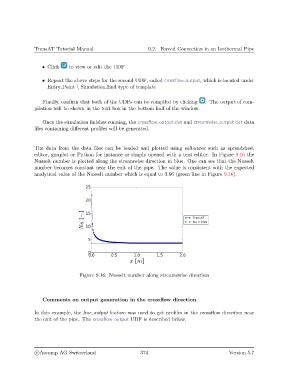
               editor, gnuplot or Python for instance or simply opened with a text editor. In Figure 9.16 the
               Nusselt number is plotted along the streamwise direction in blue. One can see that the Nusselt
               number becomes constant near the exit of the pipe. The value is consistent with the expected
               analytical value of the Nusselt number which is equal to 3.66 (green line in Figure 9.16).


                                  Figure 9.16: Nusselt number along streamswise direction


                   Comments on output generation in the crossflow direction

               In this example, the line output feature was used to get profiles in the crossflow direction near
               the exit of the pipe. The crossflow output UDF is described below.


                c
Ascomp AG Switzerland                    374                                  Version 5.7

