


Page 29 - TransAT_Tutorial_Manual
P. 29
TransAT Tutorial Manual                                           1.2. Backward Facing Step


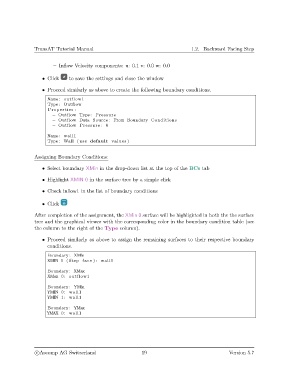
                       – Inflow Velocity components: u: 0.1 v: 0.0 w: 0.0

                   • Click    to save the settings and close the window

                   • Proceed similarly as above to create the following boundary conditions.
                     Name: outflow1
                     Type : Outflow
                     Properties :
                       − Outflow Type : Pressure
                       − Outflow Data Source : From Boundary Conditions
                       − Outflow Pressure : 0

                     Name: wall1
                     Type : Wall ( use default values )


               Assigning Boundary Conditions:

                   • Select boundary XMin in the drop-down list at the top of the BCs tab

                   • Highlight XMIN 0 in the surface tree by a simple click

                   • Check inflow1 in the list of boundary conditions


                   • Click

               After completion of the assignment, the XMin 0 surface will be highlighted in both the the surface
               tree and the graphical viewer with the corresponding color in the boundary condition table (see
               the column to the right of the Type column).

                   • Proceed similarly as above to assign the remaining surfaces to their respective boundary
                     conditions.
                     Boundary : XMin
                     XMIN 1 ( Step face ) : wall1
                     Boundary : XMax
                     XMax 0: outflow1
                     Boundary : YMin
                     YMIN 0: wall1
                     YMIN 1: wall1

                     Boundary : YMax
                     YMAX 0: wall1


                c
Ascomp AG Switzerland                    19                                   Version 5.7

