


Page 311 - TransAT_Tutorial_Manual
P. 311
TransAT Tutorial Manual                                                    7.2. coupling slug


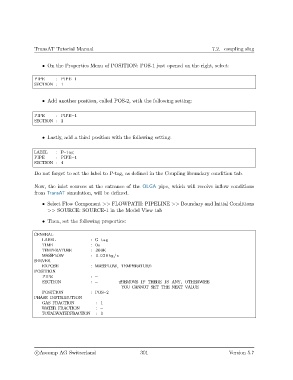
                   • On the Properties Menu of POSITION: POS-1 just opened on the right, select:

               PIPE      : PIPE−1
               SECTION : 1


                   • Add another position, called POS-2, with the following setting:


               PIPE      : PIPE−1
               SECTION : 2


                   • Lastly, add a third position with the following setting:


               LABEL     : P−tag
               PIPE      : PIPE−1
               SECTION : 4

               Do not forget to set the label to P-tag, as defined in the Coupling Boundary condition tab.

               Now, the inlet sources at the entrance of the OLGA pipe, which will receive inflow conditions
               from TransAT simulation, will be defined.

                   • Select Flow Component >> FLOWPATH: PIPELINE >> Boundary and Initial Conditions
                     >> SOURCE: SOURCE-1 in the Model View tab

                   • Then, set the following properties:


               GENERAL
                   LABEL               : G−tag
                   TIME                : 0 s
                  TEMPERATURE          : 300K
                   MASSFLOW            : 0.028 kg/ s
               SERVER
                   EXPOSE              : MASSFLOW, TEMPERATURE
               POSITION
                   PIPE                : −
                   SECTION             : −         #REMOVE IF THERE IS ANY, OTHERWISE
                                                    YOU CANNOT SET THE NEXT VALUE
                   POSITION            : POS−2
               PHASE DISTRIBUTION
                   GAS FRACTION          : 1
                  WATER FRACTION         : −
                   TOTALWATERFRACTION    : 0


                c
Ascomp AG Switzerland                    301                                  Version 5.7

