


Page 310 - TransAT_Tutorial_Manual
P. 310
TransAT Tutorial Manual                                                    7.2. coupling slug


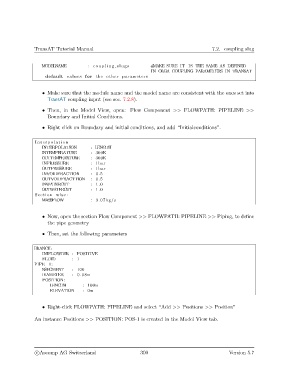
                  MODELNAME           : c o u p l i n g s l u g s  #MAKE SURE IT IS THE SAME AS DEFINED
                                                                IN OLGA COUPLING PARAMETERS IN TRANSAT
                    default values for the other parameters


                   • Make sure that the module name and the model name are consistent with the ones set into
                     TransAT coupling input (see sec. 7.2.8).

                   • Then, in the Model View, open: Flow Component >> FLOWPATH: PIPELINE >>
                     Boundary and Initial Conditions.

                   • Right click on Boundary and initial conditions, and add “Initialconditions”.


                I n t e r p o l a t i o n
                   INTERPOLATION       : LENGTH
                   INTEMPERATURE       : 300K
                  OUTTEMPEARTURE       : 300K
                   INPRESSURE          : 1bar
                   OUTPRESSURE         : 1bar
                   INVOIDFRACTION      : 0.5
                   OUTVOIDFRACTTION    : 0.5
                   INWATERCUT          : 1.0
                  OUTWATERCUT          : 1.0
                Section wise :
                   MASSFLOW            : 3.07 kg/ s


                   • Now, open the section Flow Component >> FLOWPATH: PIPELINE >> Piping, to define
                     the pipe geometry
                   • Then, set the following parameters


               BRANCH:
                   INIFLOWDIR : POSITIVE
                   FLUID       : 1
               PIPE−1:
                   NSEGMENT    : 100
                   DIAMETER    : 0.08m
                   POSITION:
                      LENGTH        : 100m
                      ELEVATION     : 0m


                   • Right-click FLOWPATH: PIPELINE and select “Add >> Positions >> Position”

               An instance Positions >> POSITION: POS-1 is created in the Model View tab.


                c
Ascomp AG Switzerland                    300                                  Version 5.7

