


Page 374 - TransAT_Tutorial_Manual
P. 374
TransAT Tutorial Manual                         9.2. Forced Convection in an Isothermal Pipe


               9.2.5    Mesh & BCs Tab

               The domain is defined and the mesh is created using this tab.

                   • If that is not already the case, select the Mesh & BCs tab at the top of the TransATUI
                     window

               Domain & Grid
                  In this section the domain and the computational grid for the simulation will be defined.

                   • Select the Domain & Grid tab in the panel on the left-hand side

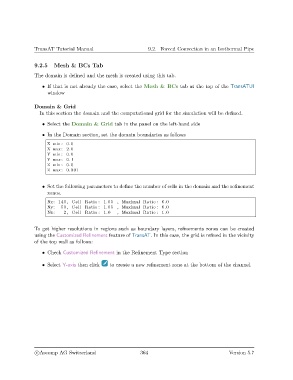
                   • In the Domain section, set the domain boundaries as follows
                     X min : 0.0
                     X max: 2.0
                     Y min : 0.0
                     Y max: 0.1
                     Z min : 0.0
                     Z max: 0.001


                   • Set the following parameters to define the number of cells in the domain and the refinement
                     zones.
                     Nx: 140 , Cell Ratio : 1.05 , Maximal Ratio : 6.0
                     Ny:   50 , Cell Ratio : 1.05 , Maximal Ratio : 6.0
                     Nz :   2 , Cell Ratio : 1.0  , Maximal Ratio : 1.0


               To get higher resolutions in regions such as boundary layers, refinements zones can be created
               using the Customized Refinement feature of TransAT. In this case, the grid is refined in the vicinity
               of the top wall as follows:

                   • Check Customized Refinement in the Refinement Type section

                   • Select Y-axis then click  to create a new refinement zone at the bottom of the channel.


                c
Ascomp AG Switzerland                    364                                  Version 5.7

