


Page 52 - TransAT_Tutorial_Manual
P. 52
TransAT Tutorial Manual            2.1. Block Mesh Refinement: Flow over Cylinder (Re=150)


               2.1.5.1   Mesh & BCs Tab
               In the Mesh & BCs tab, the domain along with the mesh are defined.

                   • Select Mesh & BCs at the top of the TransATUI window


               Domain & Grid
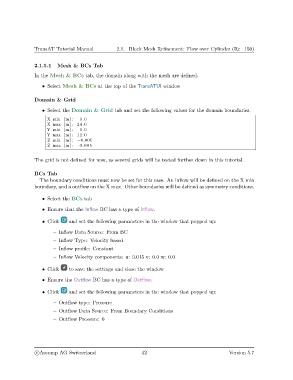
                   • Select the Domain & Grid tab and set the following values for the domain boundaries.

                     X min [m] :  0.0
                     X max [m] : 24.0
                     Y min [m] :  0.0
                     Y max [m] : 12.0
                     Z min [m] : −0.005
                     Z max [m] :  0.005

               The grid is not defined for now, as several grids will be tested further down in this tutorial.


               BCs Tab
                  The boundary conditions must now be set for this case. An inflow will be defined on the X min
               boundary, and a outflow on the X max. Other boundaries will be defined as symmetry conditions.

                   • Select the BCs tab

                   • Ensure that the Inflow BC has a type of Inflow.

                   • Click    and set the following parameters in the window that popped up:

                       – Inflow Data Source: From BC
                       – Inflow Type: Velocity based
                       – Inflow profile: Constant
                       – Inflow Velocity components: u: 0.015 v: 0.0 w: 0.0


                   • Click    to save the settings and close the window
                   • Ensure the Outflow BC has a type of Outflow.


                   • Click    and set the following parameters in the window that popped up:
                       – Outflow type: Pressure
                       – Outflow Data Source: From Boundary Conditions

                       – Outflow Pressure: 0


                c
Ascomp AG Switzerland                    42                                   Version 5.7

