


Page 322 - TransAT_Tutorial_Manual
P. 322
TransAT Tutorial Manual                                                         7.3. Oilspill


               7.3.6    Mesh & BCs Tab

               In the Mesh & BCs tab, the domain is defined, the mesh created and the boundary conditions
               set.

                   • Click Mesh & BCs at the top of the TransATUI.

               Domain

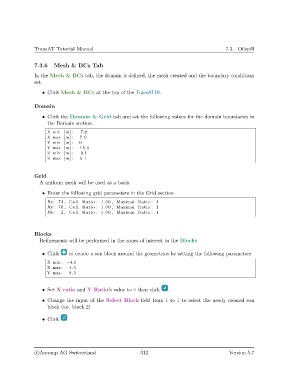
                   • Click the Domain & Grid tab and set the following values for the domain boundaries in
                     the Domain section.
                     X min [m] : −7.0
                     X max [m] :  7.0
                     Y min [m] :  0
                     Y max [m] :  15.0
                     Z min [m] : −0.1
                     Z max [m] :  0.1


               Grid
                  A uniform mesh will be used as a basis.

                   • Enter the following grid parameters in the Grid section
                     Nx: 71 , Cell Ratio : 1.00 , Maximal Ratio : 1
                     Ny: 76 , Cell Ratio : 1.00 , Maximal Ratio : 1
                     Nz :  2 , Cell Ratio : 1.00 , Maximal Ratio : 1


               Blocks
                  Refinements will be performed in the zones of interest in the Blocks


                   • Click    to create a son block around the geometries by setting the following parameters
                     X min : −4.5
                     X max:   4.5
                     Y max:   8.5


                   • Set X ratio and Y Ratio’s value to 4 then click   .

                   • Change the input of the Select Block field from 1 to 2 to select the newly created son
                     block (i.e. block 2)


                   • Click


                c
Ascomp AG Switzerland                    312                                  Version 5.7

