


Page 355 - TransAT_Tutorial_Manual
P. 355
TransAT Tutorial Manual                                                   9.1. Water suction


               9.1.5    Mesh & BCs Tab

               The domain is defined and the mesh is created in the Mesh & BCs tab.

                   • If that is not already the case, select the Mesh & BCs tab at the top of the TransATUI
                     window


               Domain & Grid
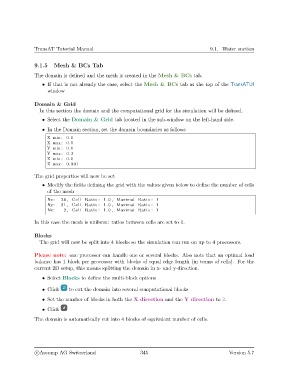
                  In this section the domain and the computational grid for the simulation will be defined.

                   • Select the Domain & Grid tab located in the sub-window on the left-hand side.
                   • In the Domain section, set the domain boundaries as follows

                     X min : 0.0
                     X max: 0.5
                     Y min : 0.0
                     Y max: 0.3
                     Z min : 0.0
                     Z max: 0.001

               The grid properties will now be set

                   • Modify the fields defining the grid with the values given below to define the number of cells
                     of the mesh

                     Nx:   26 , Cell Ratio : 1.0 , Maximal Ratio : 1
                     Ny:   31 , Cell Ratio : 1.0 , Maximal Ratio : 1
                     Nz :   2 , Cell Ratio : 1.0 , Maximal Ratio : 1

               In this case the mesh is uniform: ratios between cells are set to 1.


               Blocks
                  The grid will now be split into 4 blocks so the simulation can run on up to 4 processors.


               Please note: one processor can handle one or several blocks. Also note that an optimal load
               balance has 1 block per processor with blocks of equal edge length (in terms of cells). For the
               current 2D setup, this means splitting the domain in x- and y-direction.

                   • Select Blocks to define the multi-block options

                   • Click    to cut the domain into several computational blocks

                   • Set the number of blocks in both the X direction and the Y direction to 2.
                   • Click

               The domain is automatically cut into 4 blocks of equivalent number of cells.


                c
Ascomp AG Switzerland                    345                                  Version 5.7

