


Page 432 - TransAT_Tutorial_Manual
P. 432
TransAT Tutorial Manual                                 10.3. Droplet Impact on a Flat Plate


               Simulation Parameters
                  This tab is used to define the numerical properties of the simulation.


                   Simulation Type and Control Parameters


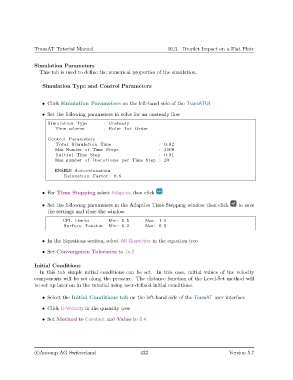
                   • Click Simulation Parameters on the left-hand side of the TransATUI

                   • Set the following parameters to solve for an unsteady flow

                     Simulation Type        : Unsteady
                        Time scheme         : Euler 1 st Order

                     Control Parameters
                        Total Simulation Time                       : 0.02
                        Max Number of Time Steps                    : 3000
                         I n i t i a l Time Step                    : 0.01
                        Max number of i t e r a t i o n s per Time Step : 20

                        ENABLE Autorelaxation
                            Relaxation Factor : 0.6


                   • For Time Stepping select Adaptive then click

                   • Set the following parameters in the Adaptive Time-Stepping window then click    to save
                     the settings and close the window
                           CFL Limits         Min : 0.5       Max: 1.0
                            Surface Tension   Min : 0.2       Max: 0.5


                   • In the Equations section, select All Quantities in the equation tree

                   • Set Convergence Tolerance to 1e-2


               Initial Conditions
                  In this tab simple initial conditions can be set. In this case, initial values of the velocity
               components will be set along the pressure. The distance function of the Level-Set method will
               be set up later on in the tutorial using user-defined initial conditions.

                   • Select the Initial Conditions tab on the left-hand side of the TransAT user interface

                   • Click U-Velocity in the quantity tree

                   • Set Method to Constant and Value to 0.4


                c
Ascomp AG Switzerland                    422                                  Version 5.7

